
Why Your OpenClaw Should Run in the Cloud, Not on Your Laptop
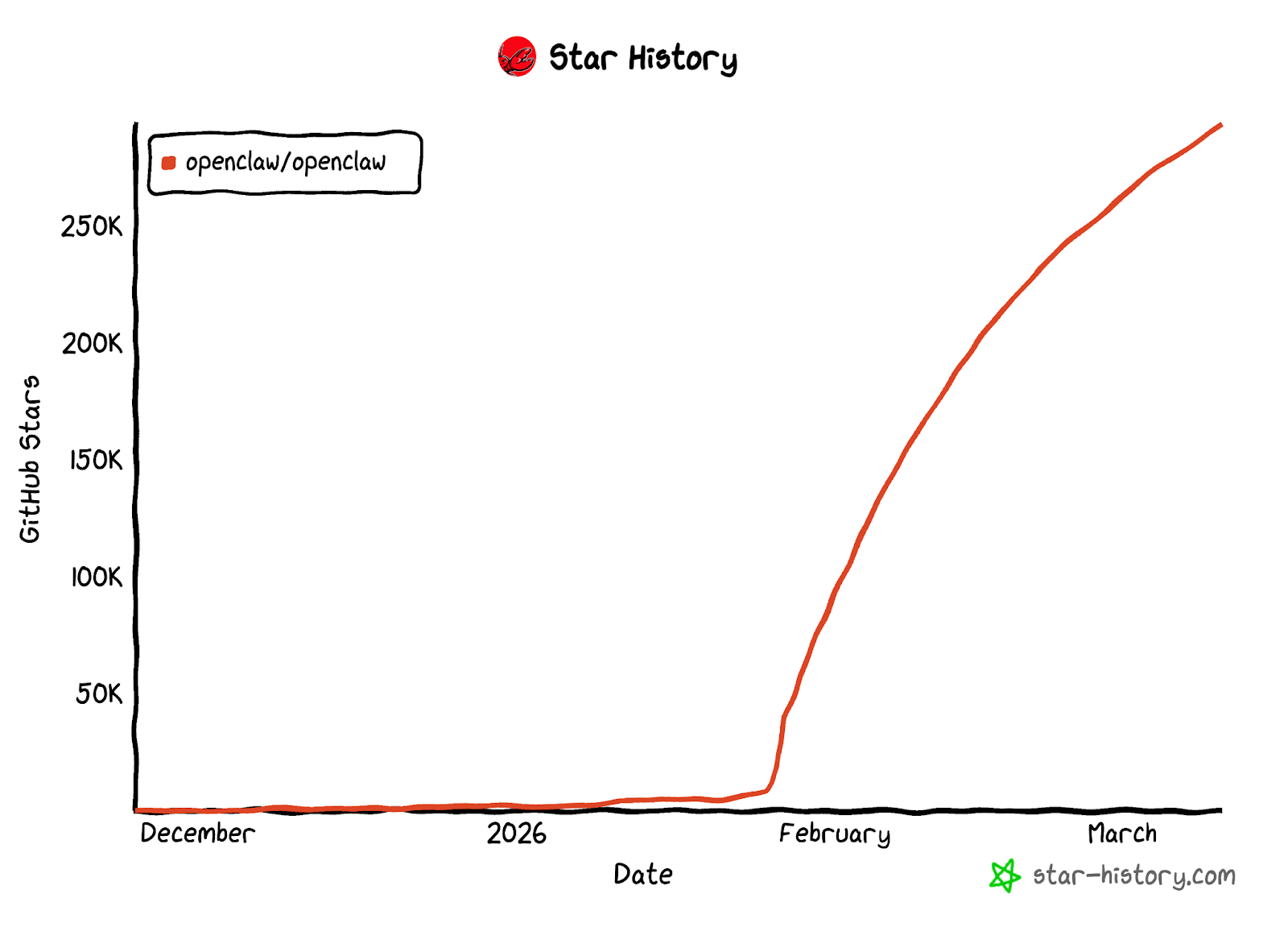
OpenClaw has surpassed 290,000 stars on GitHub, making it one of the most popular open-source AI Agent frameworks of 2026. A growing number of developers and tech enthusiasts are experimenting with deploying their own AI assistants locally.
However, local deployment presents significant challenges in practice: service interruptions when the machine shuts down, complex environment configuration, API key security risks, and more — all of which severely limit the continuous availability of an AI Agent.
Deploying OpenClaw to the cloud addresses these issues at their root. This article examines the key advantages of cloud deployment, provides guidance on selecting the right large language model, and demonstrates real-world use cases for OpenClaw.
What Is OpenClaw?
OpenClaw is an open-source personal AI Agent framework built with TypeScript. Its core capabilities include:
- 24/7 Autonomous Operation: A built-in heartbeat mechanism proactively monitors tasks and takes action without requiring continuous user intervention
- 50+ Platform Integrations: Supports WhatsApp, Telegram, Discord, Slack, Gmail, GitHub, and other major platforms for unified cross-platform management
- Model Flexibility: Compatible with cloud-based LLMs such as Claude, GPT, and Grok, as well as local models via Ollama / vLLM
- Extensible Skills System: Skills are defined using Markdown + YAML, with 100+ pre-built skills available on ClawHub
- Privacy-First Design: All data is stored locally by default, with the memory system based on local Markdown files
Unlike traditional chatbots, OpenClaw features contextual memory, proactive behavior, and tool invocation capabilities — functioning more as a persistent AI collaborator than a simple Q&A interface.
Cloud Deployment vs. Local Deployment
While OpenClaw supports local installation, cloud deployment offers clear advantages for users who require stability and continuous availability.
Local deployment is suitable for short-term testing, while cloud deployment is what enables an AI Agent to deliver continuous, reliable service. An assistant that needs to be always available requires an environment that is always online.
Deployment Cost
Running OpenClaw does not require GPU resources. A basic CPU virtual machine instance (2 cores / 4GB RAM / 20GB SSD) is sufficient for stable operation. At this configuration, Bitdeer AI Cloud's on-demand pricing is approximately $0.0363/hour (around $26/month) — providing a 24/7 online AI assistant environment at a fraction of typical infrastructure costs.
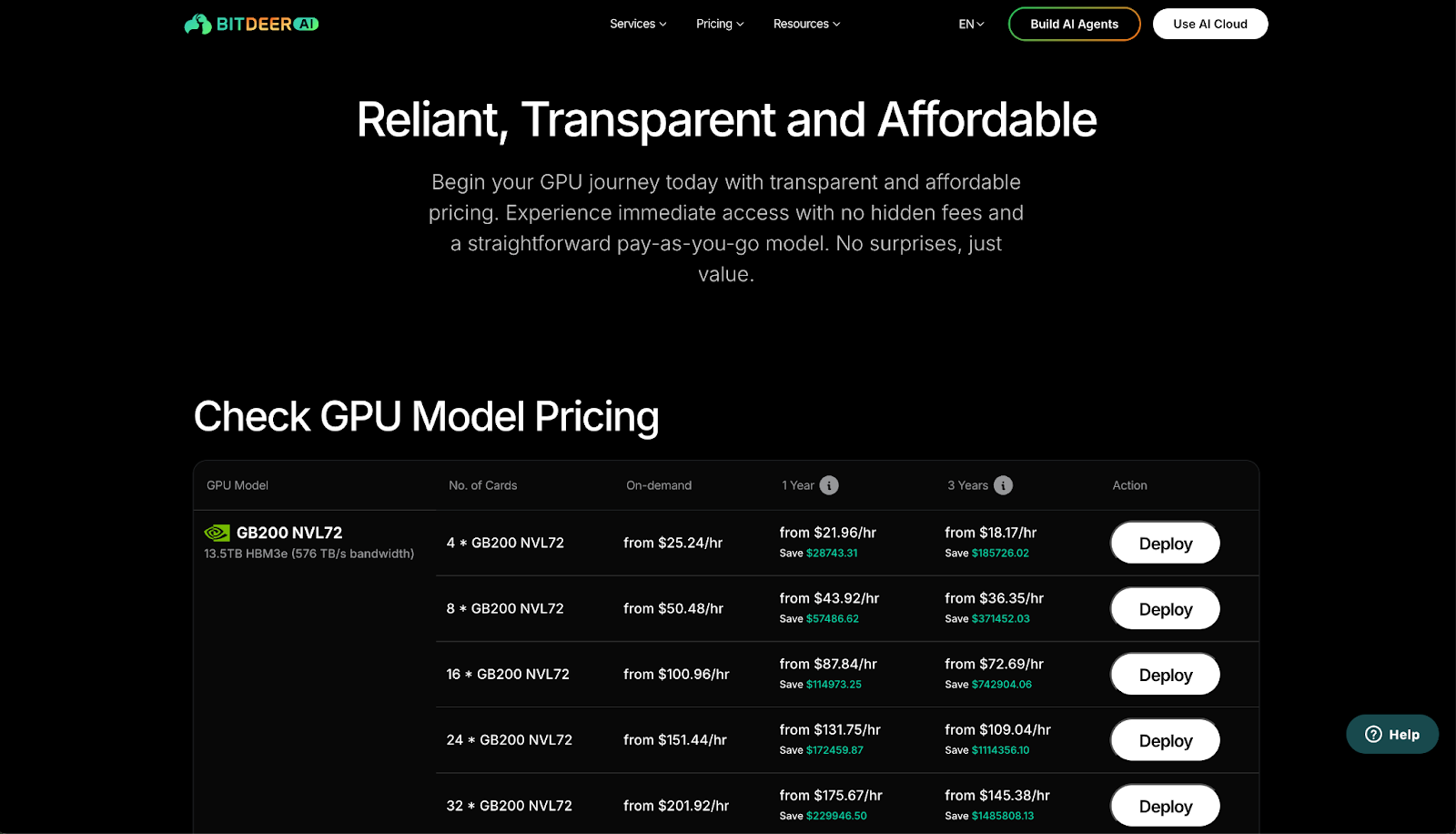
Bitdeer AI Cloud, as an NVIDIA Preferred Cloud Service Provider, offers compute resources spanning multiple generations of NVIDIA GPUs including H100, H200, B200, and GB200. For Agent deployment scenarios like OpenClaw, a CPU-only instance is all that's needed. For advanced use cases such as model fine-tuning or local inference, GPU instances are available for seamless scaling. Virtual machine instances are billed on-demand — for detailed pricing, refer to the GPU Compute Pricing page.
Model inference is handled via API calls and billed per token. Bitdeer AI Cloud provides multi-vendor inference services covering text generation and other task types. For detailed inference pricing, refer to the AI Models Pricing page.
Model Selection Guide
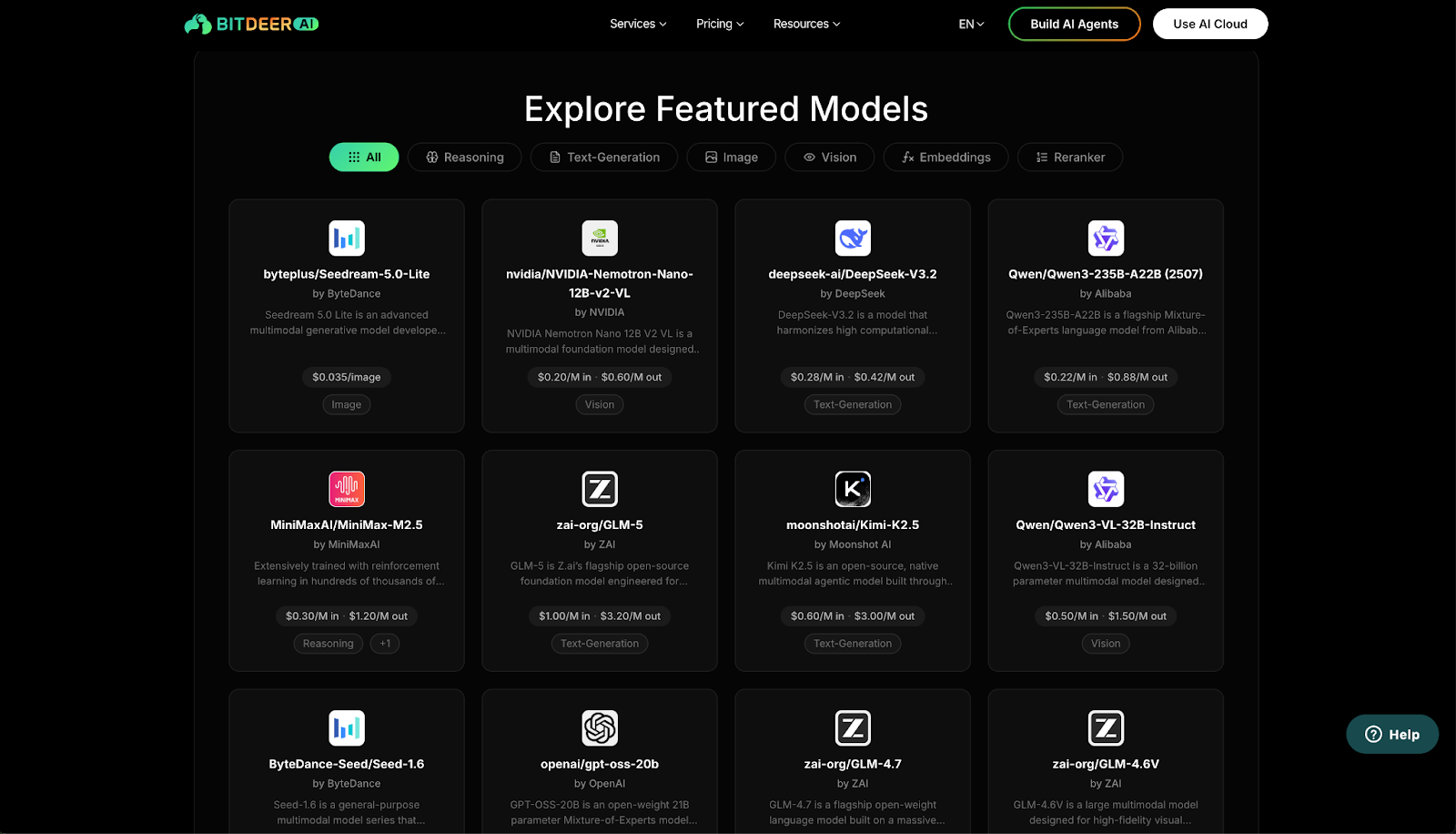
One of OpenClaw's core strengths is model flexibility — it is not locked into any single LLM provider. Bitdeer AI Cloud currently offers 40+ models from 10+ providers, spanning text generation, visual understanding, reasoning, and image generation. All APIs are OpenAI-compatible, making model switching nearly effortless.
Below are representative text generation models suitable for OpenClaw, with pricing reference:
Scenario-Based Recommendations
- Best overall value — DeepSeek-V3.2, with the lowest combined input/output cost among flagship models and industry-leading code and reasoning capabilities
- Long-context input scenarios (e.g., document analysis, email summarization) — Qwen3-235B-A22B, with input pricing as low as $0.22 per million tokens
- Deep conversational AI — Kimi-K2.5, with excellent language comprehension for high-quality conversational output
- Ultra-low cost — The platform also offers lightweight models such as Gemma and Ministral, with input pricing starting at $0.02 per million tokens for high-frequency, low-complexity tasks
For the full model catalog and interactive demos, visit Bitdeer Model Explore.
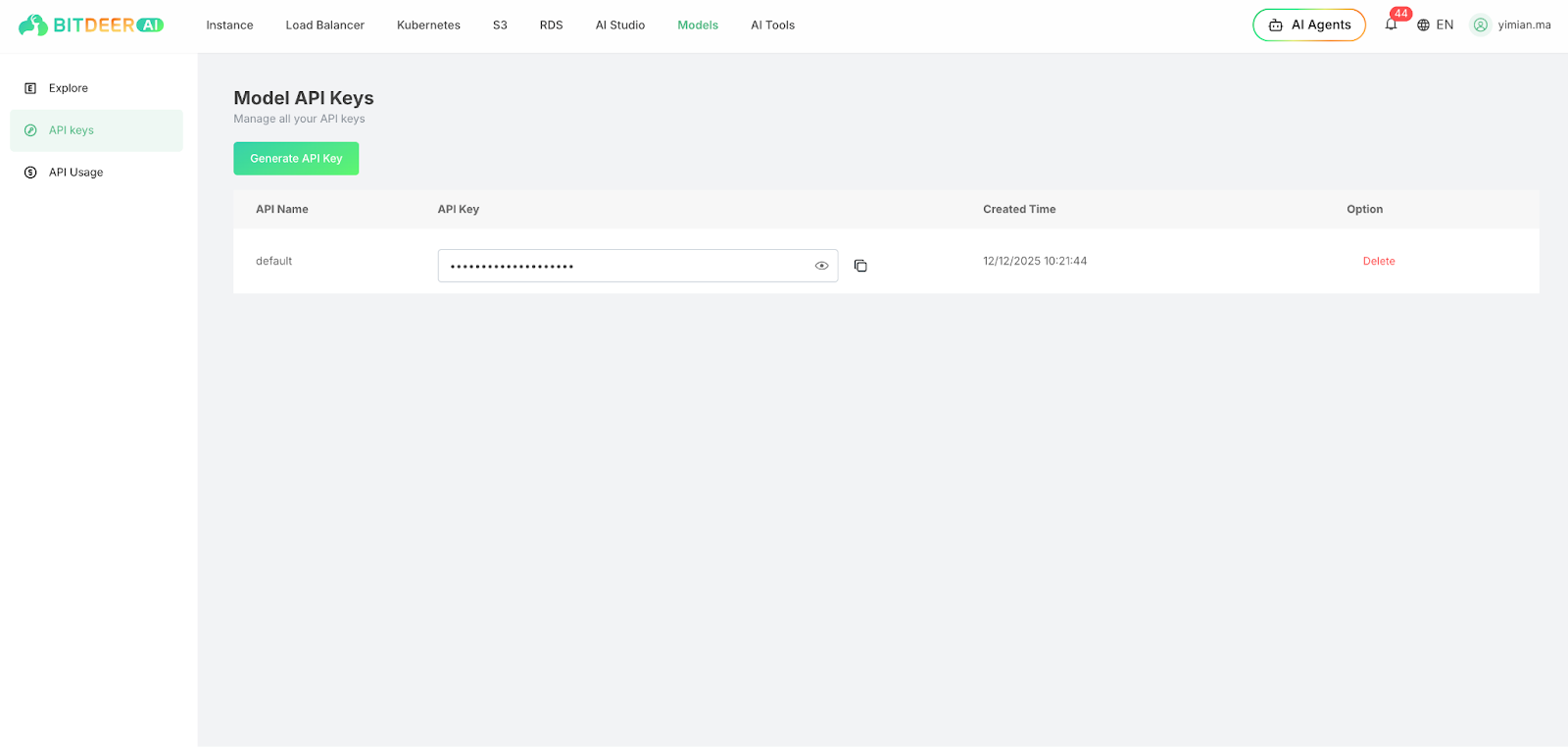
OpenClaw integrates with Bitdeer's model service entirely through its configuration file — users simply enter their API key and model name in openclaw.json, and OpenClaw handles all API communication automatically with no additional code required. All Bitdeer model APIs are OpenAI REST-compatible, allowing OpenClaw to recognize and invoke them directly.
API keys can be generated in the Bitdeer AI Cloud console under API Keys.
Deployment Guide
Bitdeer AI has published a comprehensive deployment tutorial covering everything from creating a cloud instance and installing OpenClaw to configuring model connections and integrating with Telegram. For the full step-by-step guide, refer to:
Installing and Configuring OpenClaw on Bitdeer AI Cloud
The deployment process can be summarized in five steps:
- Create a Cloud Instance — Provision a virtual machine on Bitdeer AI Cloud
- Install OpenClaw — Run the official one-line installation script
- Configure Models — Enter your Bitdeer AI API key and specify the LLM
- Connect Telegram — Pair with a Telegram Bot for mobile access
- Run in Background — The service runs continuously 24/7 with no manual maintenance required
Real-World Use Cases
Once deployed, OpenClaw delivers practical value across multiple dimensions. Below are several representative use cases:
Personal Productivity
- Connect to Gmail to automatically read emails, extract action items, and send daily digests on a set schedule
- Integrate with Google Calendar to create and manage events directly through conversation
- Perform real-time multilingual translation across English, Chinese, Japanese, Korean, and more
Research and Analysis
- Execute web searches, read page content, and generate structured summaries
- Extract key points and summaries from any given URL
- Conduct multi-step research with comparative analysis and structured report output
Code Generation and Execution
- Generate and execute code in a sandboxed environment, returning results directly
- Support for Python, JavaScript, and other mainstream languages for data processing and scripting
- Combine web search capabilities with code generation to automatically reference documentation and produce runnable solutions
These capabilities are powered by OpenClaw's skills system. Over 100 pre-built skills are available on ClawHub for immediate use. For custom skill development, refer to the OpenClaw Skills Documentation.
Conclusion
As a fully featured open-source AI Agent framework, OpenClaw — combined with Bitdeer AI Cloud's infrastructure and model inference services — provides a stable, secure, and always-online AI assistant solution.
Get Staarted
- Sign up for Bitdeer AI Cloud
- View the full deployment tutorial
- Visit the OpenClaw GitHub repository
- Bitdeer AI Documentation Center
Note:Pricing for models and GPU resources is subject to change. Please refer to the platform for the most up-to-date pricing.